Announced
Find parcels announced more than 48 hours ago without progress. Filter, search and open the parcel detail to see its status history.
MyParcel Dashboard · IN SHORT
MyParcel Dashboard by TheSEO brings shipment follow-up into one working view: delays, returns, team notes and damage files alongside the parcel. It is an independent product, with no official MyParcel affiliation. MyParcel remains the source of your shipping arrangements, labels and carrier statuses.
Independent of MyParcel · public preview with fictional sample data
Try the demoExplore what matters
MyParcel already supports several online shops. This dashboard adds a place to organise the follow-up: which parcel needs attention, what a colleague has already done and which file is still open.
That can be useful when several people monitor shipments across shops. If one quiet shop is easy to manage in the existing MyParcel overview, an additional dashboard may add little. It is not a stock, order-picking or warehouse system.
Announced highlights parcels that have gone more than 48 hours without progress, with status filters and parcel history. Shipped brings tracking statuses together and lets the team keep notes, retrieve available customs documents and export a selection as CSV. Returns separates incoming return parcels from the outgoing flow. Shops holds the connected shops, MyParcel keys and plan limits. Damage files collect the amount, notes, status and carrier deadline from Growth upwards. A prepared claim email still needs handling; it is not an automatically submitted or accepted claim. Analysis provides views over 30, 60 or 90 days, including delivery times, volume and performance by shop. The wallboard displays the overview on a shared screen. These are your operation's figures when connected, not a benchmark or a promise of faster delivery.
Find parcels announced more than 48 hours ago without progress. Filter, search and open the parcel detail to see its status history.
Review delivered, in-transit and delayed parcels. Keep team notes with the shipment, look up customs documents and export a selection as CSV.
Separate return parcels from the outgoing flow. See which are still coming back and which have arrived, with their parcel history.
Manage connected shops, MyParcel keys and plan limits. The renewed branding and customer-email chain is not yet released as a completed feature.
Keep the amount, notes, status and carrier deadline together. Included from Growth upwards, not in Starter. A drafted claim email is not an automatically sent or accepted claim.
Review patterns over 30, 60 or 90 days, including delivery times and shop performance. The wallboard shows the picture on a shared screen. Example figures are not customer results.
INTERACTIVE DESIGN PREVIEW
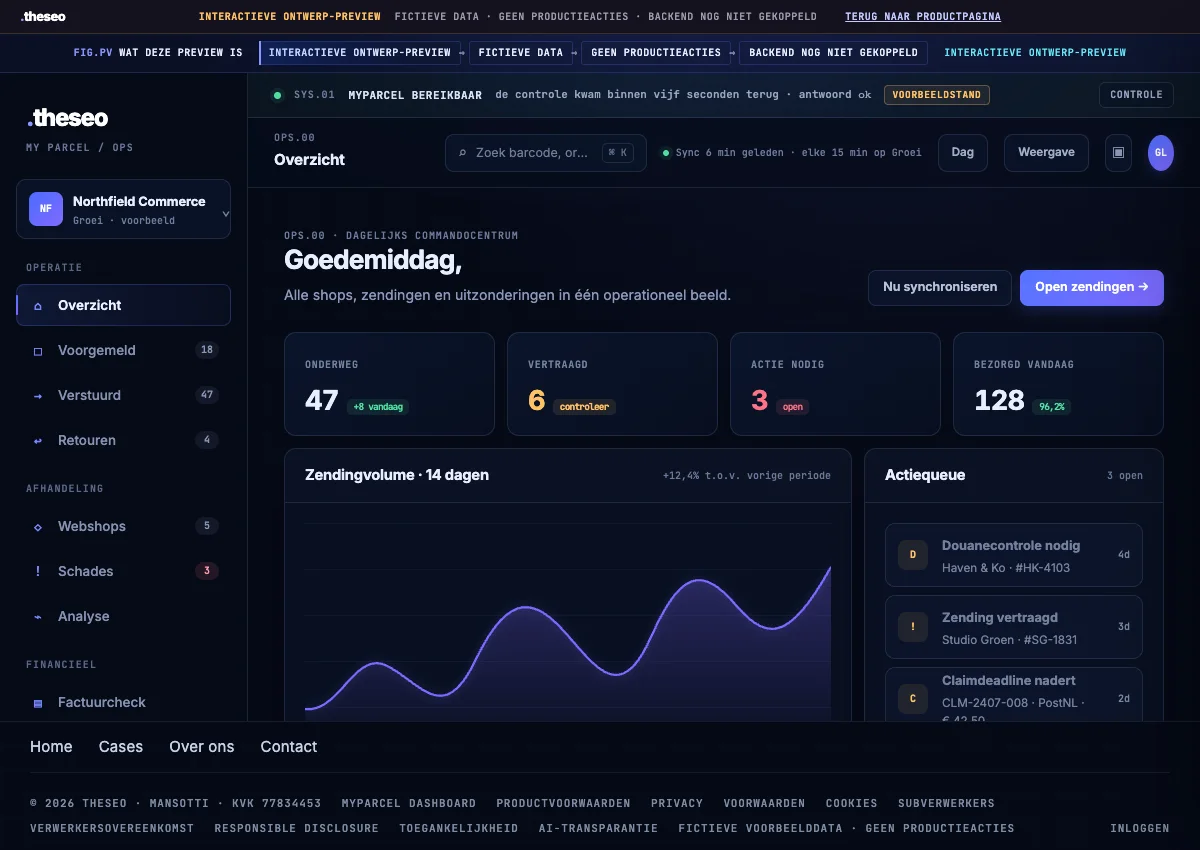
Try the overview with shipment statuses, shipping volume and an action list. The frame below opens the existing dashboard design preview.
Interactive design preview. Fictional data, no production actions. The backend is not connected. This is not a connected CRM or shipping environment.
The demo interface is in Dutch. On a small screen, you can also open it in a new tab.
Starter is €35 per month for up to 40 shops, with a 30-minute synchronisation interval. Growth is €79.99 for up to 80 shops, with a 15-minute interval and damage files. Pro is €149 for up to 250 shops, with a 10-minute interval. Enterprise is €249.99 with a five-minute interval; its advertised unlimited capacity has a technical ceiling of 9,999 shops. These are dashboard charges, separate from shipping labels and carrier costs. A shorter interval refreshes the dashboard sooner; it does not change how quickly a carrier scans or delivers a parcel. Confirm the final total and VAT treatment before payment. Monthly cancellation is the public starting position unless both parties sign a different agreement. Automatic checkout remains closed. The plan selector prepares an enquiry, so selecting a plan does not charge you or activate an account.
€35per month
€79.99per month
€149per month
€249.99per month
The English source publishes these four monthly amounts and limits, with its verification date of 28 July 2026. The final total and VAT treatment must be confirmed before payment. Automatic checkout is still closed.
Monthly cancellation is the public starting position unless an agreement signed by both parties says otherwise. Damage files start at Growth, not Starter. The renewed customer-email chain remains behind a release gate.
The pricing, security, plan-selection and existing-account destinations below are in Dutch. The public preview is also in Dutch; this English explanation does not change the application language.
Read prices and terms (Dutch)The renewed branding and customer-email chain is not yet released as a completed feature. Payment remains closed while the required checks are outstanding, including VAT treatment, payment events, organisation isolation and the customer portal. There is no promised opening date.
Agree the retention period for your organisation before supplying real shipment data. A historical duration in the English explanation should not be treated as a final data-retention agreement while the security conditions are still being established.
This layer creates no shipping labels, negotiates no rates and does not replace customer service. A damage deadline depends on the carrier and circumstances; a file helps you follow the process but cannot guarantee compensation.
For a new enquiry, describe the shops, shipment volume, people following up parcels and the exceptions that are hardest to handle. Use the plan check to establish whether the product fits before arranging access.
Existing customers can use the published dashboard route. The application, deeper product pages and plan selection are in Dutch; this English explanation does not change their language.

MEET THESEO
Working on websites and visibility since 2017. You speak directly with Gianluca.
Get in touchExplore the details at your own pace.
For fulfilment teams and online shops with parcels spread across several shops. Six workspaces, exceptions at the top, notes and damage files in one place. MyParcel stays the source of your labels and your carriers; this layer makes the daily operation around them visible.
Workspace
Administration
Several online shops means several places to look. The problem is not the time that costs, but what you fail to find with it.
Anyone running one online shop has one overview and one tab. Anyone running three, eight or forty has a ritual. You open the back office per shop, you scroll through yesterday's parcels, you click open the separate tracking pages of the carriers, and meanwhile your inbox fills with questions you can only answer after looking somewhere else.
The painful part is not the clicking. It is that the most important parcels are exactly the ones that fall away in a round like that. A parcel announced on Thursday that still has no first scan on Monday stands out in no separate overview, because in every separate overview it is one line among hundreds that look just like it. You see it once the client emails. From that moment you are no longer following up, you are explaining.
You see the same pattern with damage. A damaged parcel arrives as a client email, someone says they will look at it, and after that it sinks into an inbox. Carriers work with deadlines within which you have to report damage. Anyone without a file that holds that deadline only notices afterwards that the report was too late. Carelessness is rarely the cause. Usually it is simply the absence of a place where such a file belongs.
And then there is the third pain, the team one. Two colleagues see the same delayed parcel and do not know from each other whether anything has been done. So the client gets called twice, or not at all. There is no shared status, only a shared suspicion.
A schematic example of a manual round. The times and shops are fictional and illustrate the order, not a measured way of working.
Honest about what already exists: MyParcel itself supports several online shops in one account. The difference is in what you do with the parcels afterwards.
The shipping contract, labels, rates, collection and the scans on the way. Everything that physically puts a parcel in motion and the statuses that come out of it.
Every connected shop in one picture, exceptions at the top, notes and follow-up at the parcel, damage files with the deadline in them, and analysis across the shops.
Stock, order picking, warehouse locations and purchasing. If that is what you are after, you belong with a WMS. We do not do it and we do not pretend to.
This page starts with what already exists, because otherwise the story does not hold. MyParcel can hang several online shops under one account itself. If all you want is to make labels for three shops, you need nothing here. You feel the difference the moment those parcels have to be watched daily by more than one pair of hands.
What this layer adds is not another list of parcels. It is a different order. In a shipping overview parcels sit by date. In an operational dashboard what sits at the top is whatever deviates: what has stood still too long, what is coming back, what has damage, what nobody has picked up. The rest can stay quietly at the bottom, because there is nothing to do with it.
Context is kept alongside. A note at a parcel, a damage file with an amount and a deadline, a history you can search back over 24 hours, 7, 30, 90 or 365 days, and across everything built up inside the eighteen month retention period: that is what a team needs in order not to start over every morning. If you want to see exactly how the data arrives and what is and is not stored, that is on the how it works page and in the security explanation.
And the most important caveat is on every page of this product: this is an independent product from TheSEO and not software from MyParcel itself. There is no official affiliation, no partner status and no shared brand. MyParcel is the party you make your shipping arrangements with; we read the parcels out with your key and build the operation around them.
MP.01 to MP.04 are properties of the product and the plans, not results and not usage figures. Source: features.json and prices.json.
The product is not one list with filters. It is six workspaces that each serve their own moment in the parcel cycle. Below is what is in each workspace and what you open it for.
A parcel is announced the moment the label is created and the carrier is expecting the package. Between that moment and the first scan sits a gap where in practice most of the quiet problems begin: a package that was not handed over, a label that ended up on the wrong pile, a collection round that was skipped.
This workspace watches exactly that gap. Parcels announced longer than forty-eight hours ago without progress come to the top instead of sinking away. You filter on status, sort the list by what matters to you, and set which columns stay visible yourself, so your screen looks the way your operation works.
From the list you open the parcel detail with the full status history, and you search on the recipient when a client calls without an order number to hand. The question this workspace answers is short: what has stood still before the client notices?
Functions according to features.json: detection of forty-eight hours of delay, status filters, sorting, your own columns, parcel detail, searching on recipient.
The example is schematic, with fictional orders and shops. The bar shows how long a parcel has been announced without a first scan.
As soon as a package has its first scan, it moves to Shipped. Here sits the tracking status of every parcel across all connected shops, with filters for delivered, in transit and delayed. You choose how far back you look: twenty-four hours, seven days, thirty, ninety, three hundred and sixty-five days, or everything.
The difference with an ordinary tracking page is in what you can put next to it. At every parcel you record a note, so the next colleague sees that the client has already been called and what was agreed. From the same row you start a damage file if the package arrived damaged, and you open the customs document if the parcel is going outside the EU.
Anyone who wants to process their figures elsewhere exports the selection as CSV. This is deliberately not a locked down report: it is your data, in a file every spreadsheet opens. The question here is: which parcel on its way is asking for a human?
The functions listed in features.json: tracking status, filters for delivered, in transit and delayed, history windows from 24 hours to everything, notes, damage claim, customs document, CSV export.
History window
Schematic example again, this time with fictional orders and notes. Notes are free text from your team, not something the system fills in.
A return is technically just another parcel, and that is exactly why returns make so much noise in an ordinary list. Without recognition a return label counts as a new outgoing parcel, the same order number appears two or three times, and nobody knows any more whether that package is going out or coming back.
This workspace recognises returns as returns and sets them apart. You filter on what is already in and what is still on its way, and per row you open the parcel detail with the full history, so you can see when the label was created and where the package is.
The practical effect is that your outgoing flow makes sense again. Your Announced and your Shipped are about packages going to clients, and returns have their own place with their own question: what is coming back, and is it in yet?
Functions according to features.json: return detection, filters for return received and in transit, parcel detail.
Without return recognition
With return recognition
Also schematic, with fictional order numbers in it. It shows the difference in presentation, not a measurement of return rates.
This is the administration part. You add online shops, change them or take them out, and per shop you record the MyParcel key the parcels are fetched with. How many shops you may connect depends on your plan, and that counter is simply in view, so you do not run into an unexpected limit.
Per shop you see its own figures, so you can compare without building a report first. Client communication sits here too: the sender, the colours and the content of the emails per online shop, a history of what has been sent, a daily digest and the option of a sender domain of your own.
One thing belongs here honestly. The renewed email chain around branding and client emails is still behind a release gate and is released only once the chain has been walked through end to end. The public gate register says the same thing, and we only take it off this page once it really holds.
From features.json, the functions here: adding, changing and removing a shop, MyParcel key, plan limit, figures per shop, branding, client email, email history, daily digest, own sender domain.
A schematic example with fictional shop names. The limit of 80 online shops belongs to the Growth plan and comes from prices.json.
Damage is where money quietly leaks away. Not because nobody wants to pick it up, but because a damage report in an inbox has no deadline and a file in a spreadsheet has no owner. Carriers work to deadlines within which you have to report, and anyone who runs past them gets nothing back.
In this workspace you create a file from the parcel itself. The carrier deadline belongs to the file and its progress is visibly in view, so not as a date somewhere in a field but as something running while you watch. You record the amount, you move the status through the phases, and you write notes on what was agreed.
A drafted claim email already comes with it, so the report itself does not become a writing exercise, and you can search the history for older packages when a client raises it late. Important for your plan comparison: damage files are in the plan from Growth upwards, Starter does not have them.
Functions according to features.json: creating a file, the carrier deadline, a drafted claim email, the amount, the status progression, notes, visible deadline progress, searching historical parcels.
Schematic once more, with a fictional damage file. The bar stands for deadline progress in the product; the length of a deadline differs per carrier and per situation.
The five preceding workspaces are about today. Analysis is about the pattern. You choose a period of thirty, sixty or ninety days and see the delivery rate in it, the average delivery time, the busiest day, the spread across the weekdays, the monthly volume and the main destinations.
The part used most is shop performance, because that makes visible what you never see in separate accounts: that one shop structurally delivers more slowly than the others, or that the peak at one shop falls on Monday and at another on Thursday. Which is exactly the kind of insight you only get when your shops sit in the same picture.
You can also put the picture full screen as a wallboard, for a screen in the warehouse or the office. No separate licence, no extra module: it is the same data, larger. And note the nature of these figures: they are your figures from your parcels, not a benchmark and not a promise from us.
In features.json these functions are named: a period of 30, 60 or 90 days, delivery rate, average delivery time, peak day, weekday chart, shop performance, monthly volume, main destinations. The wallboard is in features.json under the functions that apply everywhere.
A schematic example with a fictional spread and shop names. It shows which fields exist, not the outcomes of a real operation.
You keep your existing process at MyParcel. This layer changes nothing about how you ship; it changes what you see and what you do afterwards.
You put your shops under one organisation and record the MyParcel key per shop. The plan limit is visibly in view.
Parcels and statuses are fetched periodically, at an interval that belongs to your plan: from thirty minutes down to five minutes.
Standstill, returns and damages come to the top. The rest stays quietly at the bottom, because there is nothing to do with it today.
Notes, files and status stay with the parcel, so the next colleague does not start working it out again.
What happens exactly between steps two and three, which fields are stored and for how long, is written out on the how it works page. The underlying sources are machine readable: the route register, the function map and the status of the release gates sit as JSON in the document register, so you can read them yourself without taking us at our word.
A dashboard that promises everything does nothing well. So here are the boundaries, before you read on.
Where you have to be for these things instead.
Three situations in which we are honestly not the right choice.
The amounts come from the current Stripe products. The limits come from the production configuration. Both sit in the same machine readable register.
Properties of the plans, not results. The bars are in proportion to the highest limit and are a rendering, not a measurement.
For a compact team that wants to centralise the overview.
Starter in detail →For a growing operation with more daily volume.
Growth in detail →For teams structurally managing several shops.
Pro in detail →For larger environments and guided setup.
Enterprise in detail →Price source: Stripe live mode · verified 2026-07-28 · automatic payment is deliberately still off until the release gates are green. The exact total and the VAT treatment are confirmed in Checkout before payment. Full explanation on the pricing page.
The order is fixed and is the same on every page of this product. Step three is deliberately still closed.
The full interface with fictional sample data, without an account and without a sales conversation first. All six workspaces, plus parcel detail, search and the wallboard. Nothing is sent to production.
Open the preview →We look together at your shops, your volume and the question of whether this product earns you anything. If it does not fit, we say so. That is not politeness but self-interest: a client in the wrong place leaves anyway.
Start the plan check →Automatic payment is off until every release gate is green: the VAT treatment, idempotent handling of payment events, tenant isolation, the client portal and a successful test payment from end to end.
waiting on release gatesWhy that third step is closed you can read rather than assume. The status of every gate is in the public gate register, and what sits behind it is explained on the security page. We name no date on which the button opens, because that date depends on the gates and not on our planning.
This list is not here for show. Everything on the left can be read back or checked; everything on the right we deliberately do not promise.
Five things that can be checked.
Six things you will never read here.
Nine questions about the boundary, the plans and the status of the payment route.
No. MyParcel Dashboard is developed independently by TheSEO and has no official affiliation with MyParcel. MyParcel stays the party where you arrange your shipping contract, your labels and your carriers. This dashboard reads out the parcels of your connected online shops and lays an operational layer over them.
That is right, and we always say so. The difference is not in connecting shops but in what you do with the parcels afterwards. This layer puts exceptions at the top instead of every parcel by date, keeps notes and follow-up with the parcel, keeps damage files with the carrier deadline in them, and shows analysis across all shops instead of per shop separately.
No. Not a single label is created, no rate is negotiated and no carrier is booked. That stays entirely with MyParcel and your carriers. This is a reading layer with follow-up on top, not a shipping platform.
No. There is no stock management, no order picking and no warehouse layout in it. If that is what you are after, you belong with a warehouse system and not with us. This layer starts the moment a parcel is announced and stops once the file around it is closed.
The synchronisation interval depends on your plan: 30 minutes on Starter, 15 minutes on Growth, 10 minutes on Pro and 5 minutes on Enterprise. Those intervals come from the production configuration and are also in the machine readable price register.
Starter sits at 40 online shops, Growth at 80, Pro at 250 and Enterprise at unlimited, with a technical ceiling of 9,999. Those limits are hard: they sit that way in the application configuration and in the price register.
No. Damage files are in the plan from Growth upwards and Starter does not have them. That is a plan property from the same configuration as the shop limits and the synchronisation intervals.
Yes. The platform preview is public and asks for no account. You click through all six workspaces, the parcel detail, the search function and the wallboard. Everything you see there is fictional sample data and nothing is sent to production.
No, and that is a deliberate choice. The automatic payment route is off until the release gates are green, among them the VAT treatment, idempotent handling of payment events, tenant isolation, the client portal and a successful test payment from end to end. Until then the start runs through a plan check in which we first look at whether your situation fits.
The rest of this product, and the work we do around it. Having the online shop itself built or rebuilt runs through our work as a WordPress specialist.
The preview is public and asks nothing of you. If you like what you see, in the plan check we look together at whether your shops, your volume and your way of working benefit from this. An independent product from TheSEO, not software from MyParcel itself.