JARVIS / PRODUCT AND CONCEPT
The Jarvis platform tour, twelve screens.
What is included in Start and Solo?
Jarvis Start and Solo give one person one document workspace. Save text and Markdown, edit documents, use document history and choose which compatible AI connection may read or write. Your own AI app and model usage remain separate.
Start includes one AI connection and 7 days of document history. Solo includes three connections and 30 days of document history. These are connections to your own AI apps, not autonomous workers. Team and Business are still in development and cannot be ordered here.
Use Jarvis from your own TheSEO account. A free account and a Jarvis subscription are separate choices. With an active Jarvis subscription, you can open your workspace and manage your subscription from your account.
The product page shows which plans you can order. Choose your language and whether you are buying as an individual or a business. Before payment, you will see the amount, subscription period and terms for your choice.
The twelve screens below belong to the public concept demo with fictional data. The real Start/Solo entry is the personal document workspace in your account. The demo is not a tour of included subscription features.
Further reading: the broader organisation concept
Real software, made up content
Product pages like to show mockups a designer made and nobody has ever been able to click. This is not that. The screens below come from the interface running on the demo, and you can open that interface yourself. There is no sign-up in front of it, no trial period behind it and no sales email attached to it. One honest note: the demo interface itself is in Dutch, because it is a compiled preview and we have not translated it.
What is made up is the content. The names, companies, instructions, messages and numbers in the screens are example data. They are there to show the shape: what a priority looks like, how a source conflict is shown, how an approval is asked for. Read them as illustration and not as a result, and certainly not as something we are putting forward as evidence.
The preview also carries out no production actions. No email goes out, nothing is published and the payment button opens no real payment. That is not a choice made by the tour but the state of the product: real authentication, live connections, tenant provisioning and the payment route are still behind release gates. Which ones exactly and what their status is, is on the security page and in the documentation.
Twelve screens, one navigation
FIG.01The left hand column of the platform is the whole floor plan. Every line is a route, and every route has one job. This list comes from routes.json, the machine readable product status; you can check it without having to take our word for it.
Start with what counts today
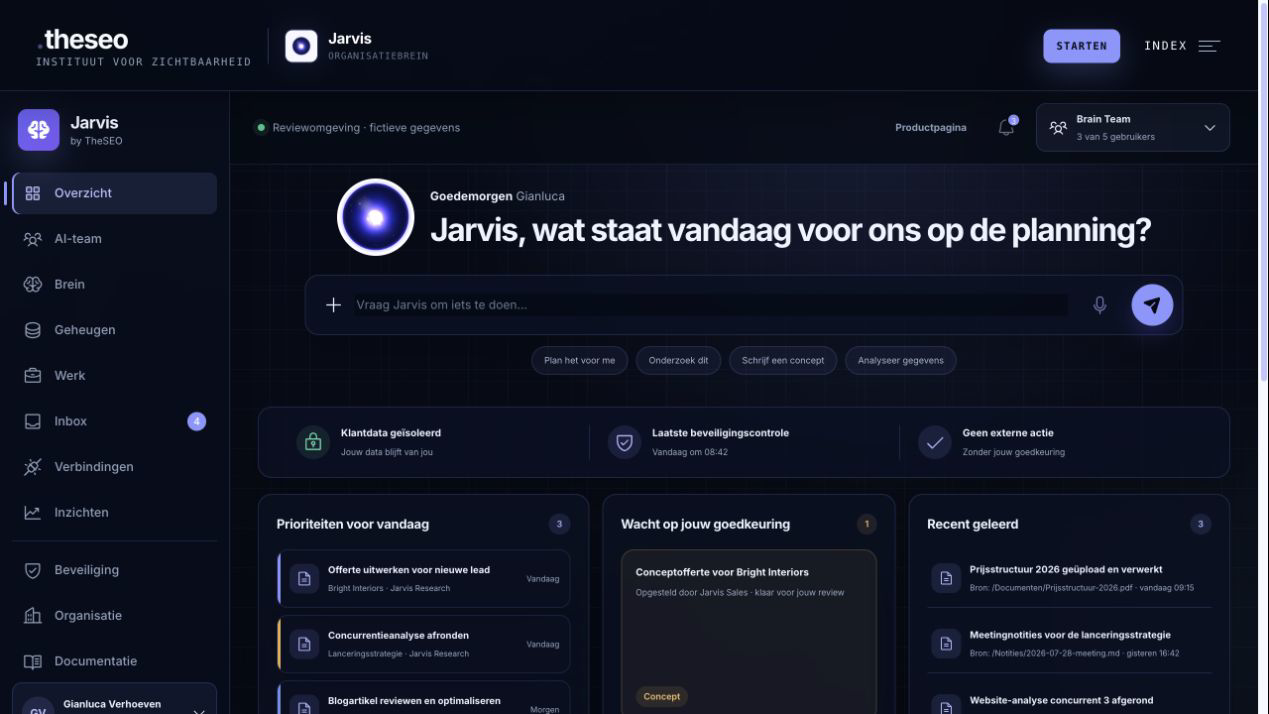
FIG.02The first screen is not a dashboard full of graphs but a working day. At the top is the instruction bar where you ask for something in plain words. Below it are today's priorities, what your AI team is doing at this moment, what is waiting on your approval and what the brain has recently learned.
Where the work itself happens
AI team. Under the team route are the AI workers who operate from the same brain, each with a role and a visible current activity. One researches, another writes, another watches the inbox and the planning. The point is not that there are many of them but that they share the same sources and the same arrangements; which ones fit in your plan is on the pricing page. If you would rather not set such a worker up yourself but have one built and managed, that is the AI worker (NL) we deliver under Mansotti, the company of which TheSEO is the trading name, from 950 euro per month excluding VAT.
Work. The work route shows missions and tasks: what is running, what is finished and which sources it rests on. A task without a traceable source is, in this design, an incomplete task. That way you can still see afterwards why something was done and not only that it was done.
Inbox. This is where the questions, results and approval requests from your AI team arrive. You open a message and see the full context beside it instead of a single sentence. Reply, and your reply is added as the next instruction. That is the difference between a list of notifications and a place of work: your answer does not disappear, it becomes the next step.
See where knowledge comes from
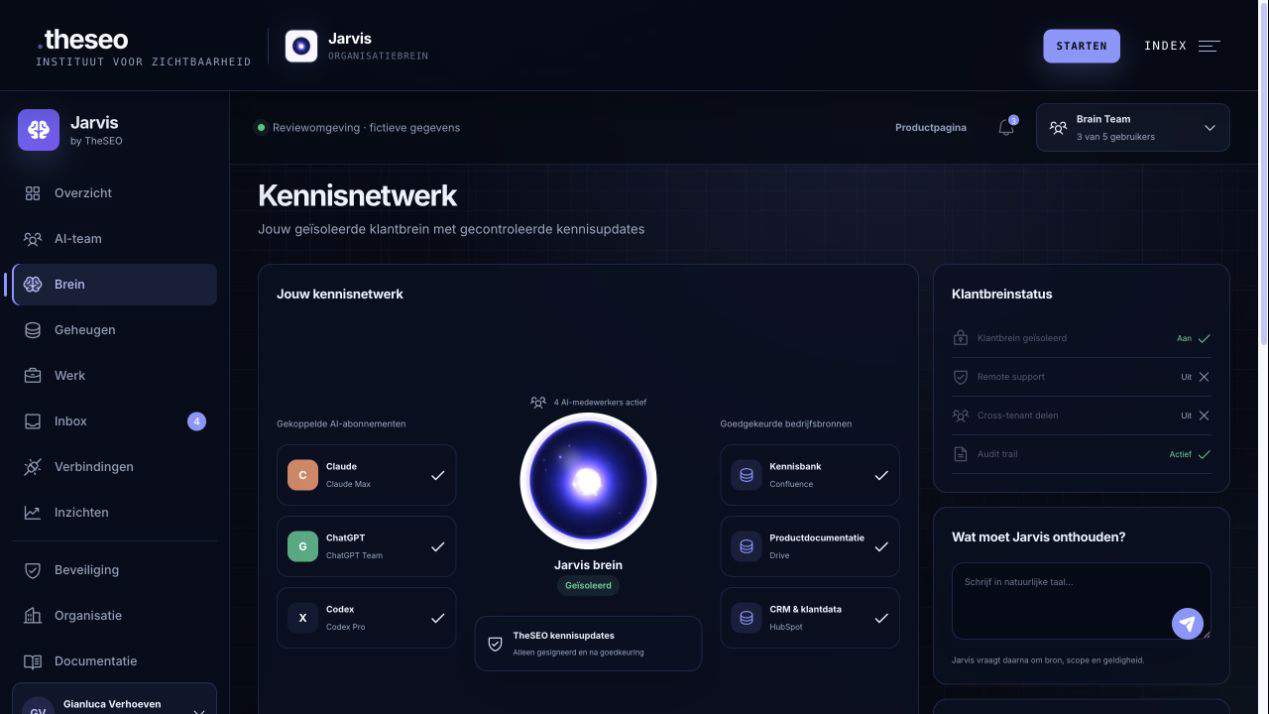
FIG.03The knowledge network shows what Jarvis knows, where it came from and where it applies. You filter on source status and on scope, and you see which sources contradict each other. That last one is not a fault but a function: when sources conflict you get a review task instead of one confident answer.
The three screens nobody puts on a screenshot
Connections. This is where you connect the AIs you already use and the company sources you work with. Two things stand out. You see in advance which scopes a connection asks for, so giving permission is a choice and not a formality. And the model runs on your own subscription: there is no bundle of tokens from us quietly sitting in between. Which suppliers sit behind those connections is set out at the sub-processors behind Jarvis. Why that is so is in why Jarvis does not charge per AI question.
Insights. This route shows signals about value per workflow, source quality and approvals. In the demo those are graphs with made up numbers; they are there to show the shape and are emphatically not a promise about what you would achieve. What the route does show is which things this product thinks are worth measuring: whether the knowledge is right and whether decisions move through, not how many prompts were sent.
Security. The security route brings access, sessions and keys, remote support and the audit trail together in one place. That is the same logic as the rest of the product: control is not a setting you have to dig for but a screen you can go to. What happens to your data is a different question from who may reach it; that one is answered at the privacy statement and Jarvis. The full explanation of what sits behind it is on security, including the points that still have to be proven.
A subscription without a usage meter
FIG.04The organisation route holds users, organisation brains, AI workers, version history, support and invoices. What it emphatically does not hold is a counter of prompts, calls or tokens. The number of AI questions is not part of the price, and you can see that in this screen.
Note two things. First, these amounts themselves carry the status proposition in validation: read them as the plans currently on the table and not as final rates. Second, the demo is a design preview with example data: the amount shown there next to the managed AI worker is not a rate. What does hold: an AI worker (NL) that we build, train and manage starts at 950 euro per month excluding VAT, and we deliver that under Mansotti, the company of which TheSEO is the trading name. The full plan comparison is on the pricing page.
The tax line in the demo is a design field, not a released calculation. No country or checkout context has been approved. Country-specific tax treatment remains pending until human approval and a tested checkout context exist for that customer type, country and locale.
Jarvis is not available to order. You can only choose a preferred draft plan and join the non-binding waiting list. This is not an order and creates no agreement or payment obligation. Nothing is charged.
Five steps before activation
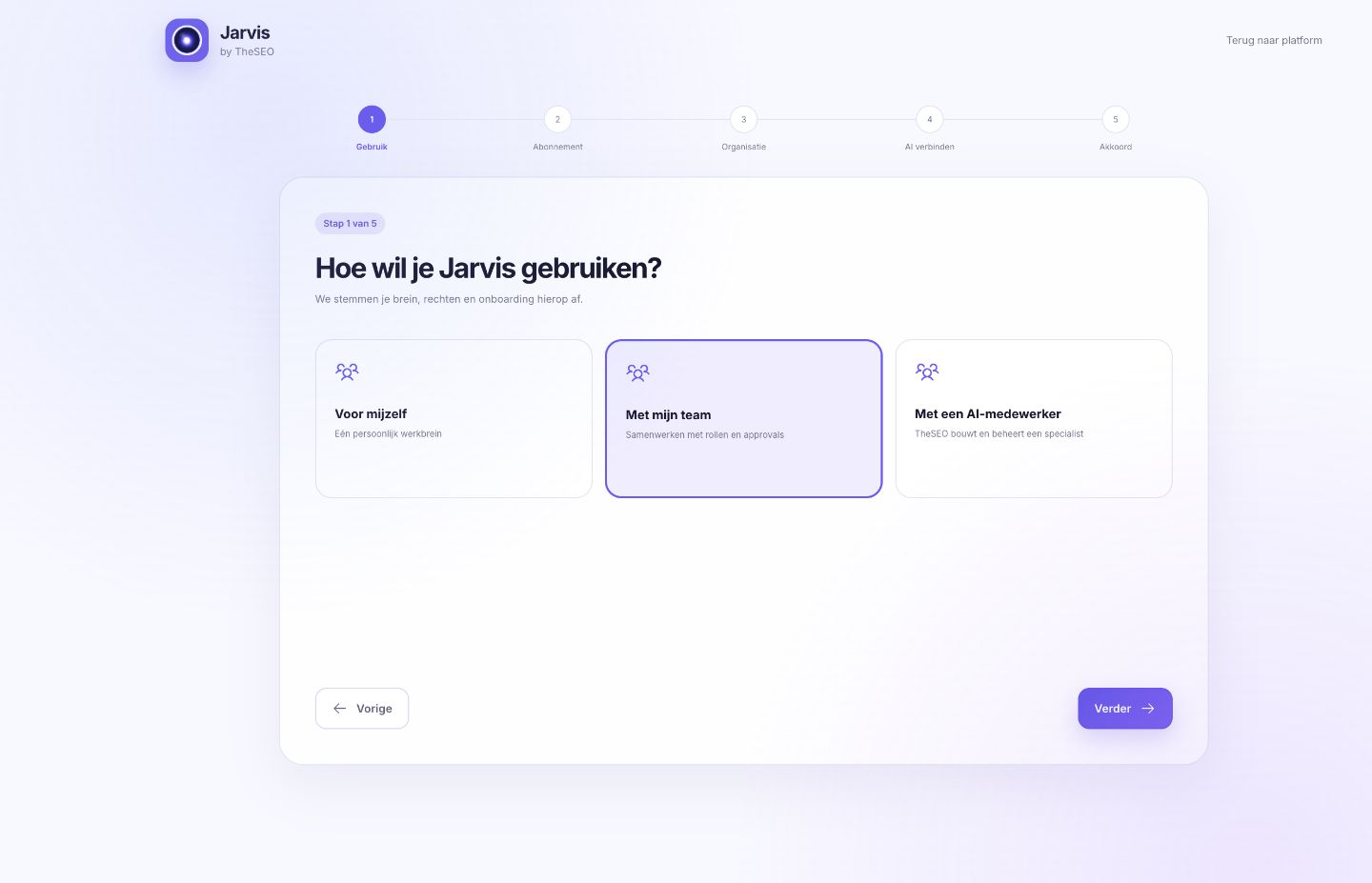
FIG.05The onboarding route confirms five things separately before a brain is created. You can skip steps and safely finish them later, but the last step stays shut until the agreement is there. Which processing arrangements that step refers to is set out at the data processing agreement for Jarvis. In the demo you can walk through all five.
The same control, a smaller screen
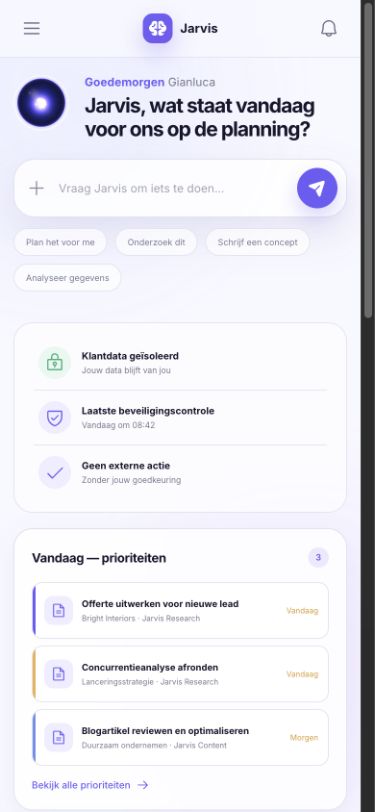
FIG.06The core flow has been checked at a screen width of 390 by 844 points. Instruction bar, security status, priorities and the navigation menu stay reachable without you having to scroll sideways. A large screen is still nicer for the knowledge network, but approving something on the move need not be a problem.
What works and what does not yet
FIG.07A tour that only shows what is finished is advertising. So both columns are here: what you can really do in the preview, and what is not connected yet. The right hand column is the reason paying online stays shut and the demo runs on fictional example data.
This works in the preview
- Giving instructions and seeing the context that is gathered for them.
- Approving and rejecting, including the difference between a draft and something sent.
- Assessing memory proposals and walking through knowledge reviews.
- Opening the inbox, reading a message and replying with a follow up instruction.
- Following task statuses on the work route.
- Switching between plans and payment intervals.
- Walking through the full five step onboarding.
This is still a release gate
- Real authentication and session management in production.
- Production tenant isolation with a negative test set that proves it.
- OAuth connections with the services you already use.
- The payment route through Stripe, including webhooks.
- Creating and setting up a real client brain.
- Observability in production.
- The legal pieces: eight of the twelve documents in the trust centre still carry the word draft in their title.
First inspect the product, then join the waiting list
Frequently asked questions
Is the demo the real Jarvis interface?
Yes. The demo at /jarvis/app/ is the same interface you see on this page, with the same routes and the same interactions. What is not real is the content: all names, instructions, companies and numbers are example data we made up to fill the screens. So you are looking at real software with fake data, not at a series of pictures. The interface language of that demo is Dutch.
Do I need an account to open the demo?
No. You click the link and the interface is there. There is no sign-up, no email address and no trial period that runs out. That is possible because real authentication is one of the release gates that is still open: the preview runs on example data and does not connect to a production environment.
Which screens are in the platform?
Twelve routes. Overview is the start of the day, AI team shows the workers who operate from the same brain, Brain is the knowledge network with sources and conflicts, Memory is where new knowledge is proposed, Work holds the missions and tasks, Inbox the questions and results, Connections the connected AI subscriptions, Insights the quality and approval signals, Security the access and the audit trail, Organisation the subscription and the invoices, Documentation the register and Onboarding the five steps before activation.
Can I break something in the demo or send something by accident?
No. The preview carries out no production actions. No email goes out, nothing is published and the payment button opens no real payment. Click everything: approve, reject, assess a memory proposal, switch a plan. Refresh the page and it is all back as it was.
Does Jarvis work on a phone?
The core flow has been checked at a screen width of 390 by 844 points: the instruction bar, the security status, the priorities and the navigation menu stay reachable without you having to scroll sideways. So the demo opens on your phone too, although a large screen is nicer if you want to look at the knowledge network.
What happens after the demo?
You can carry on for free with the company brain template, the manual version of the same idea in a file you put into Claude, Codex or Cursor. Jarvis itself is not available to order. You can only choose a preferred draft plan and join the non-binding waiting list. This is not an order and creates no agreement or payment obligation. Country-specific tax treatment remains pending. The checkout and provisioning routes remain behind release gates.
The tour ends where you begin yourself
Everything above you can check yourself in a few minutes. Click through the twelve routes, approve a draft, assess a memory proposal, switch a plan, walk the onboarding up to the gate that stays shut. There is nothing you can break and nothing goes out.
If questions about data, permissions or evidence come up afterwards, those are on security and in the trust centre. If you want to know why the product is built this way, read the choices in the knowledge section or the daily cycle on how it works. And if you just want to try it without software: start with the company brain template (NL).

Product boundaries
What is the current Start/Solo workspace?
A personal document workspace for one user and one brain, with text and Markdown, document history and explicitly authorised AI connections. Your own AI subscription remains separate.
Are the twelve demo screens included?
No. The public concept demo presents a broader organisation system with fictional data. Team work, autonomous tasks and team approvals are not included in Start or Solo.
Where can I see whether ordering is available?
On the current product page. An order button appears only for a matching available offer from the current catalogue. This documentation and the machine-readable price source do not enable sales.
Existing documentation and sources
- Open the demo (Dutch interface) →
- See the pricing
- overview
- how it works
- security
- trust
- get started
- documentation
- routes.json
- AI worker (NL)
- source provenance
- the sub-processors behind Jarvis
- why Jarvis does not charge per AI question
- the privacy statement and Jarvis
- prices.json
- the data processing agreement for Jarvis
- Download the template (NL)
- knowledge section
- human approval
- ai and automation
- software
- contact
- More about the institute